




How to Achieve IFRS 16 Compliance with Sage X3 ERP
I. Understanding IFRS 16: The Impact on Lease Accounting
On January 1, 2019, the IFRS 16 accounting standard was introduced to enhance financial transparency by requiring companies to recognize a “right-of-use” (ROU) asset and a corresponding lease liability for most lease contracts.
This standard creates a single lessee accounting model, requiring the recognition of assets and liabilities for all leases, unless the underlying asset is of low value or the lease term is 12 months or less For instance, when a company leases an office or machinery, the right of use must be recorded in the financial statements as both an asset and a liability for the accumulated future value, which must be adjusted throughout the lease’s lifecycle.
II. Sage X3 Capabilities for IFRS 16 Lessee Obligations
Sage X3 offers dedicated capabilities to help companies fulfill their lessee obligations under IFRS 16 by leveraging its comprehensive Fixed Assets module.
The primary strength of Sage X3’s solution is its deep system integration, allowing lease data to flow directly into fixed assets and financial ledgers.
However, it is important to note that these processes are not entirely automated; some manual tasks remain, meaning the standard solution may require additional management overhead for companies dealing with a very high volume of leases.
III. Integrating Lease Accounting with the Sage X3 General Ledger
Lease accounting in Sage X3 is deeply integrated with the general ledger. Establishing this integration requires mapping specific Chart of Accounts codes, such as Fixed Assets (Right of Use), Accumulated Depreciation, ROU Lease Obligation, and Interest Expenses to the appropriate Accounting Codes for Lease Contracts and Fixed Assets.
Furthermore, Sage X3 ensures that transactions accurately reflect net present values and interest charges by utilizing specifically modified Automatic Journals (such as REPAY and FXDPR).
IV. Key System Components for IFRS 16 Configuration
The foundation of IFRS 16 compliance in Sage X3 is built upon two primary pillars: the lease contract, which defines the agreement’s terms and conditions, and the fixed asset, which represents the right of use . To seamlessly enable this framework and achieve full compliance, several critical system components must be accurately configured:
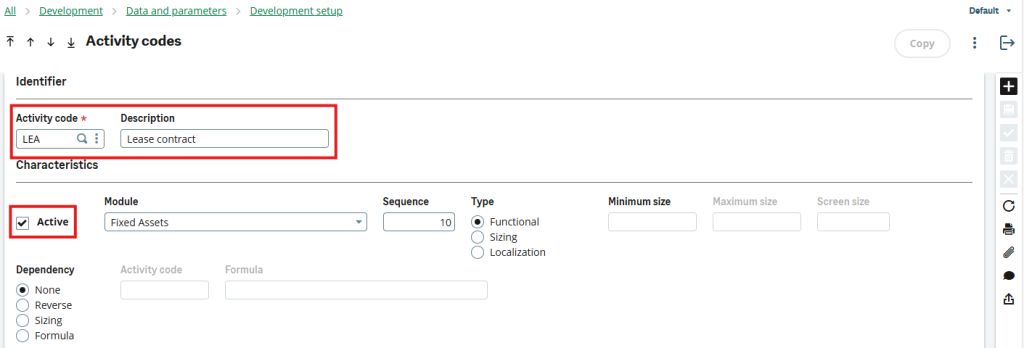
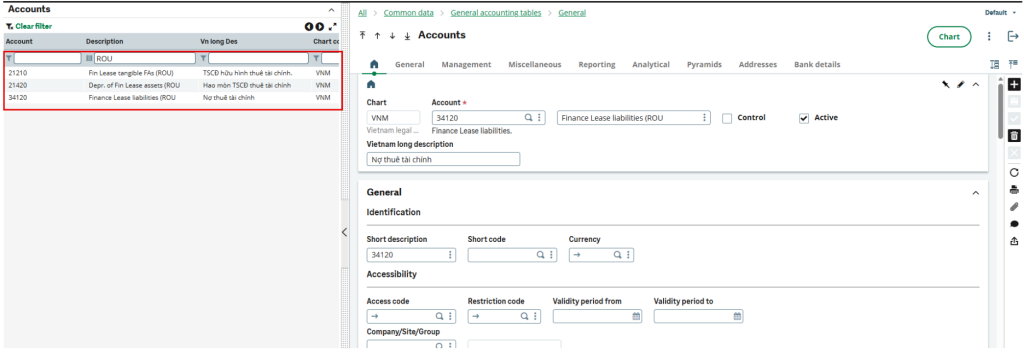
Chart of Accounts: Specific accounts for ROU assets, liabilities, and expenses must be established.
Accounting Codes: GL accounts must be mapped to specific Account Codes for “Lease Contract” and “Fixed Assets”.
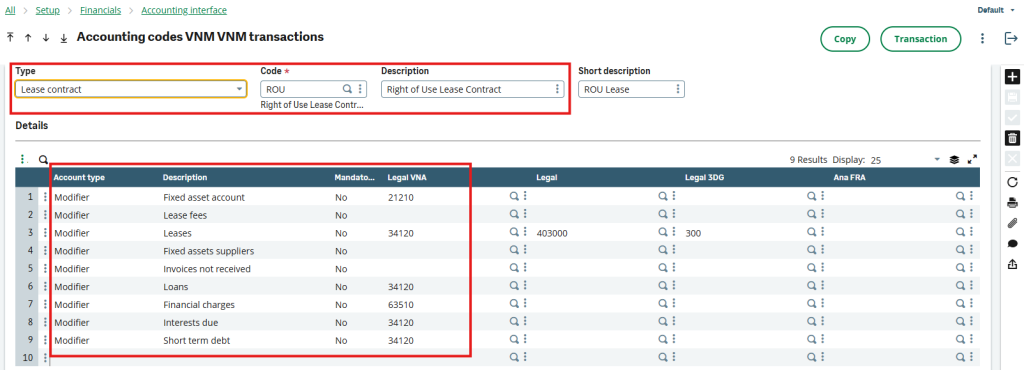
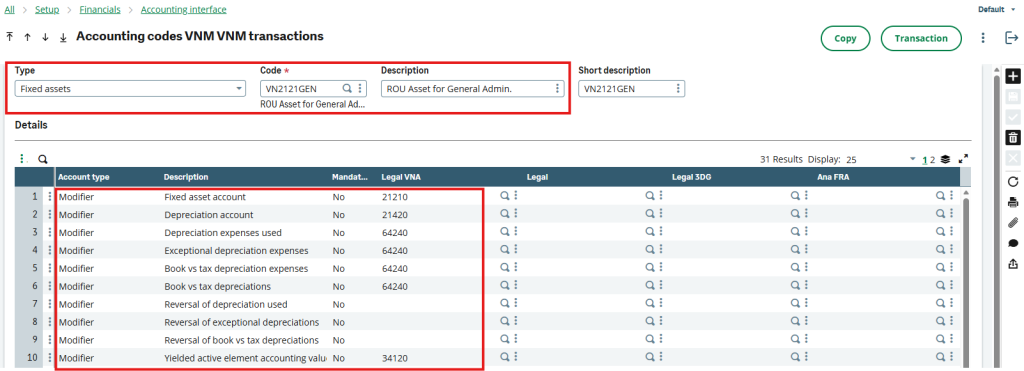
Accounting Entry Types: Types such as RNTCRE (Creation), RNTPAY (Payments), and RNTISS (Sales & Disposal) must be replicated and updated to link to the proper Account Plans.
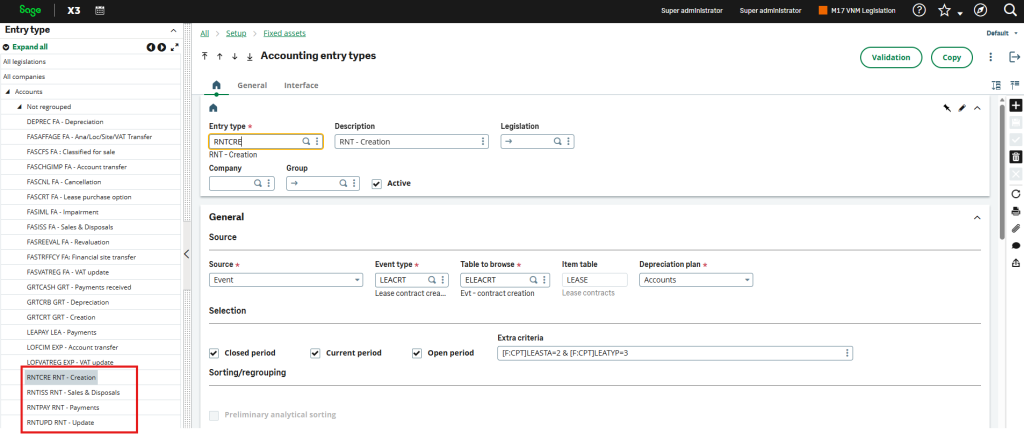
Automatic Journals: Lines within journals must be modified to capture the net present value instead of the total actual payment, and to trigger interest expense captures during payment generation.
| Ref. | Automatic Journal | Automatic Journal Line | Reason for modification |
|---|---|---|---|
| A4a | REPAY (Rent: Payment) | Line 1: Lease Payment | To capture the net present value, instead of the actual total payment |
| A4ab | REPAY (Rent: Payment) | Line 23: Interest Charge IAS | To capture the interest expense when generating the payments |
| A4c | FXDPR (FA – Depreciation) | To also include Asset Holding Type = Rented, when generating depreciation. |
V. Managing Right-of-Use (ROU) Assets in Sage X3
The fixed asset in Sage X3 supports the right of use for lease agreements and is subjected to depreciation over time. This capability aids in accurately conveying the financial implications of leases on the company’s balance sheet.
Manual Creation and Importation process: Sage X3 provides flexibility in how lease data is recorded:
- Manual Creation: Users can manually create a lease contract by entering key details (such as dates, lessor, and amounts) and ensuring the Contract Type is set to “Rent,” which is mandatory to generate the net present value.
- Importation Process: To streamline data entry, users can duplicate the standard Sage X3 import template to create a customized version. This allows users to prepare their Open Item Schedules (monthly payment periods, rental amounts, and interest expenses) in MS-Excel and import them directly into the system using CSV formats
VI. Step-by-Step Guide: Managing the Lease Lifecycle in Sage X3
6.1. Contractual Fields for Lease Management:
To accurately manage leases under IFRS 16, Sage X3 requires users to meticulously populate specific contractual fields that dictate the financial valuation of the ‘Right of Use’ (ROU) asset. Essential valuation metrics, such as the implied interest rate, incremental borrowing rate, initial direct costs, and restoration costs must be entered manually
- Establishing the core agreement also necessitates defining the Lessor, Balance sheet line, Start and End dates, Accounting Code, and Currency
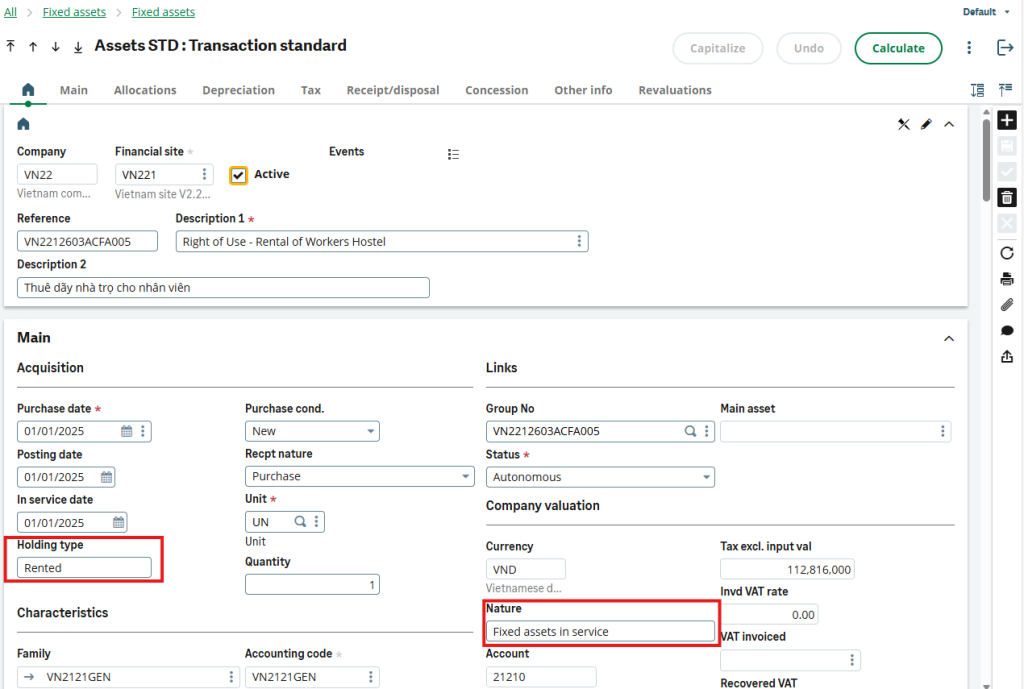
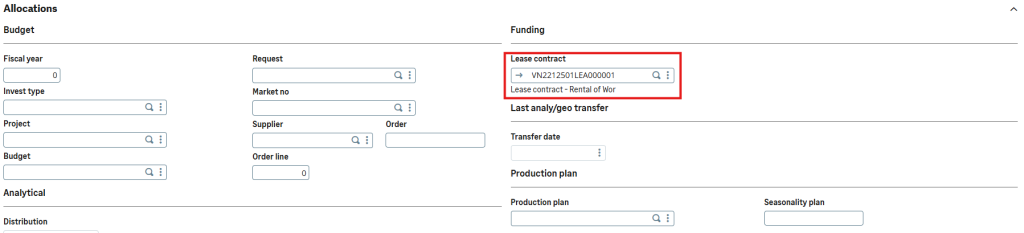
- Finally, to achieve seamless system integration and link the ROU asset to the agreement, the contract’s “Nature” must be designated as “Fixed assets,” and the corresponding asset’s “Holding type” must be strictly set to “Rented”
6.2. Schedule management parameters:
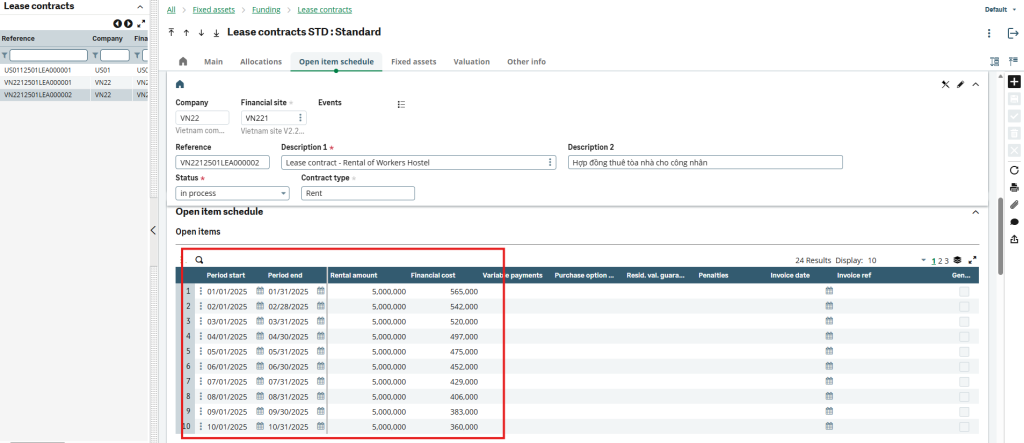
In Sage X3, lease schedules are centrally managed within the “Open Item Schedule” section. Here, users define the core financial timeline of the agreement by inputting essential parameters for each installment, specifically the Period Start, Period End, Rental Amount, and Financial Cost (interest). To ensure comprehensive IFRS 16 compliance and accurate annual revaluations, the system also accommodates the manual input of more complex variables, such as variable payments, residual value guarantees, purchase option prices, and potential early termination penalties.
6.3. Automatic NPV Calculation for Lease Contracts:
Sage X3 ensures precise financial tracking by automatically calculating the lease contract’s net present value (NPV) as soon as foundational parameters, such as the interest rate and payment schedule, are updated
- This critical calculation forms your financial baseline, as the generated NPV must be used as the primary acquisition cost (entered in the “Tax Excl. Input Val” field) when capitalizing the corresponding Right of Use asset
- To further support comprehensive reporting, the system manages both initial and newly converted values across defined currencies, ensuring users always have access to up-to-date data during contract validations and lifecycle updates.
6.4. Events During contract Lifetime:
Sage X3 tracks and manages various financial events throughout the lifespan of a lease contract:
Creation & Validation: Contracts are created, validated, and accounting entries for the initial creation are generated.
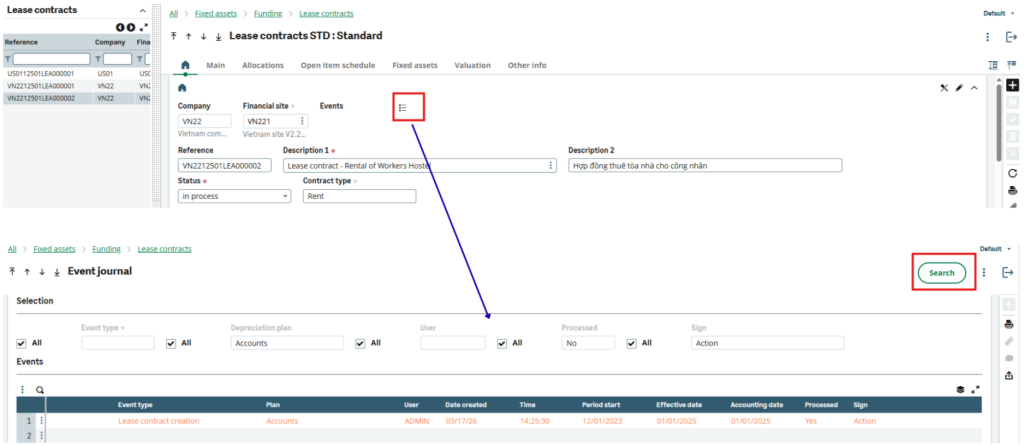
Depreciation & Payments: The system generates regular right-of-use asset depreciation schedules and monthly lease payment fee events.
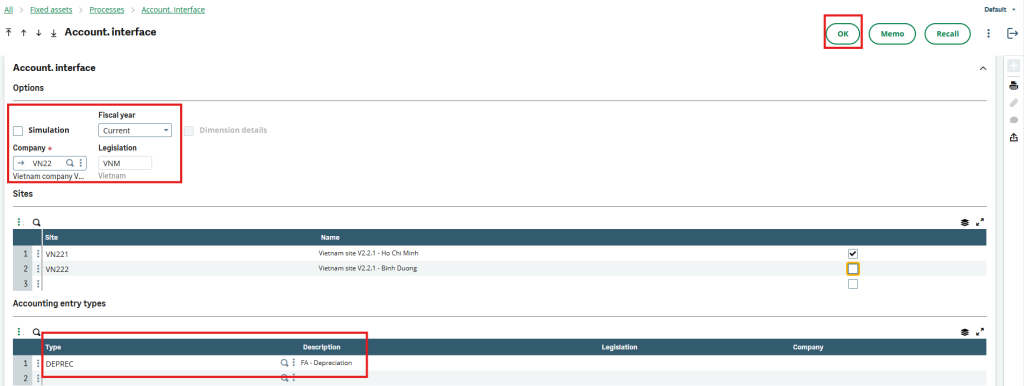
Contract Updates: If variables like interest rates change, the contract can be updated, which automatically updates the Event Journals and necessitates an adjustment to the ROU asset’s value.
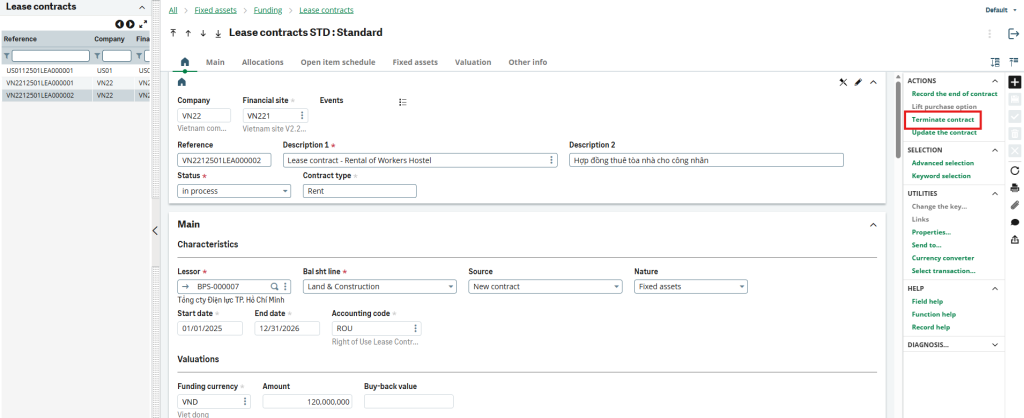
Termination: At the end of the term, the contract can be formally recorded as completed. In cases of early termination, the system flags the asset as a “Sale/Disposal” and reverses the ROU Asset and Accumulated Depreciation accounts
VII. Sage X3 Versions and Requirements for IFRS 16
7.1. Available Sage X3 versions: IFRS 16 compliance features are natively integrated into standard Sage X3 versions 11 and 12. To leverage these built-in lease accounting capabilities, You simply must ensure their environment is equipped with an active Fixed Assets module.
7.2. Required activations: To utilize the IFRS 16 features in Sage X3, administrators must activate the Fixed Assets module and ensure that the “LEA” (Lease contract) Activity Code is set to Active
7.3. Functionality Out of Scope: Sage X3’s IFRS 16 solution focuses on foundational integration, providing users with precise, hands-on control over key processes such as lease scheduling, fixed asset creation, and rental management. While the out-of-the-box features effectively support typical lease portfolios, enterprises managing exceptionally high volumes of leases have the opportunity to enhance the system’s mass-processing capabilities. Furthermore, businesses requiring advanced data imports or specific localized modifications can achieve this through dedicated technical scoping beyond the standard templates.
7.4. Legal Disclaimer and Considerations: The configuration details and capabilities provided are intended solely as general software information to address common business software issues. It is always highly recommended to consult our certified Sage X3 financial consultant for all compliance, tax, and accounting-related questions. The information is provided “as is” and should not be construed as professional financial advice.
VIII. Streamline Your Financial Audit with Sage X3 and ekino
Leveraging Sage X3 for IFRS 16 compliance empowers finance teams to seamlessly integrate their lease portfolios directly into their overarching ERP environment. While it requires diligent initial setup regarding accounting codes and automatic journals, the resulting alignment between your Right of Use assets and organizational liabilities drives a highly transparent, compliant, and unified financial operation.
For businesses looking to optimize this module, Ekino Vietnam stands ready to help tailor your Sage X3 environment to your specific volume and workflow requirements.